Desktop app for weather radar research

Radarx

A research workstation for weather radar data.

Open a radar file, look at it in 2D and 3D, clean it, run algorithms on it, merge several radars, and export the result with a record of how it was made. Everything on screen is observed data, a labelled method applied to it, or a labelled picture. Nothing is invented.

Radarx is a research visualisation tool. It is not a forecast or a warning tool: for warnings, follow your national weather service.

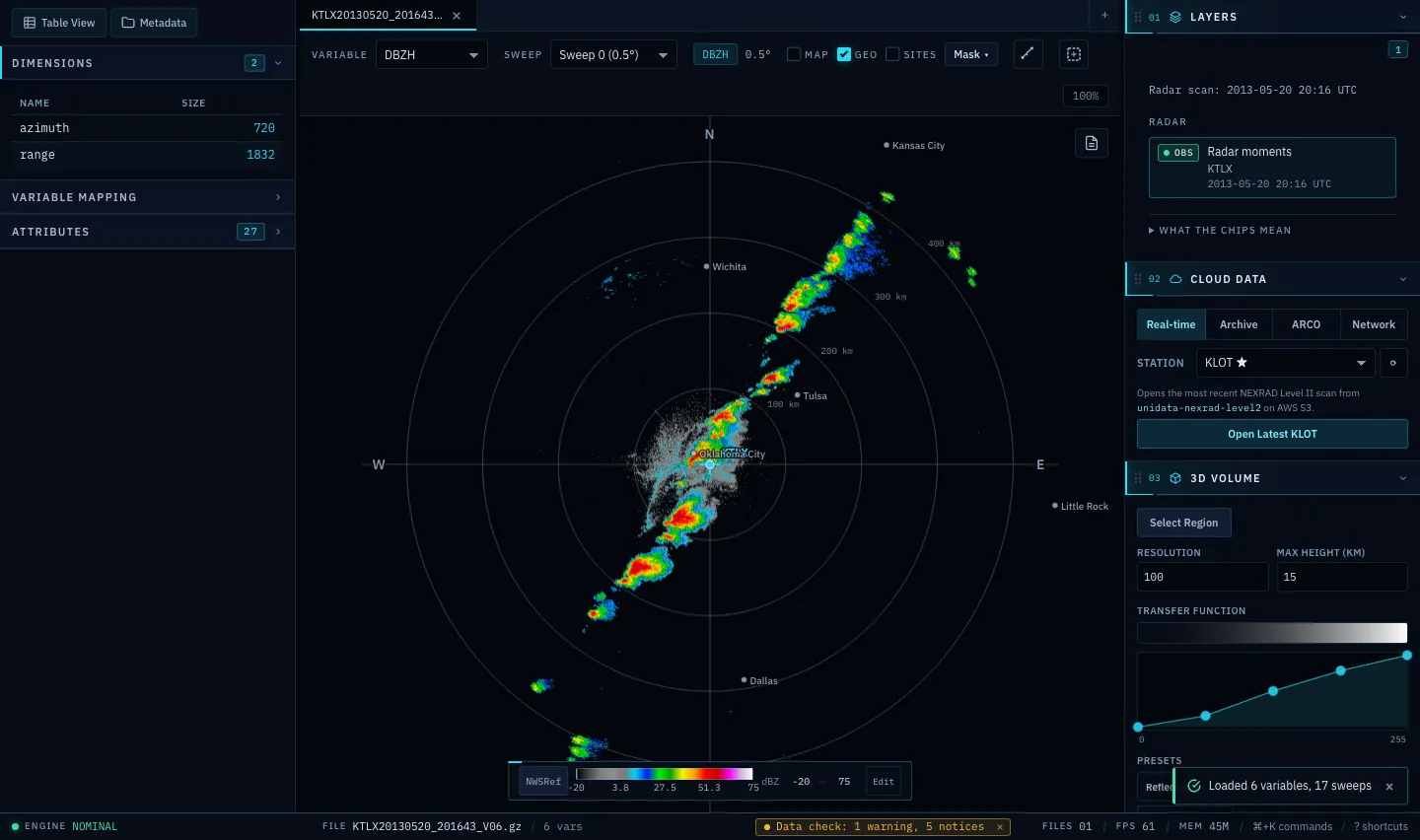
The Radarx window showing a plan-position radar scan of a line of storms across Oklahoma, with the layers panel on the right
Reflectivity from the KTLX radar (Oklahoma City), 20 May 2013, 0.5 degree sweep, NEXRAD Level II data, shown in Radarx. Screenshot of the app with its map background switched off.

What you can do

From a file to a result you can check

Radarx opens NEXRAD, ODIM, CfRadial, IRIS, Rainbow, Furuno, IMD and UF files, and more through the xradar library. The installers include everything: there is no Python to set up.

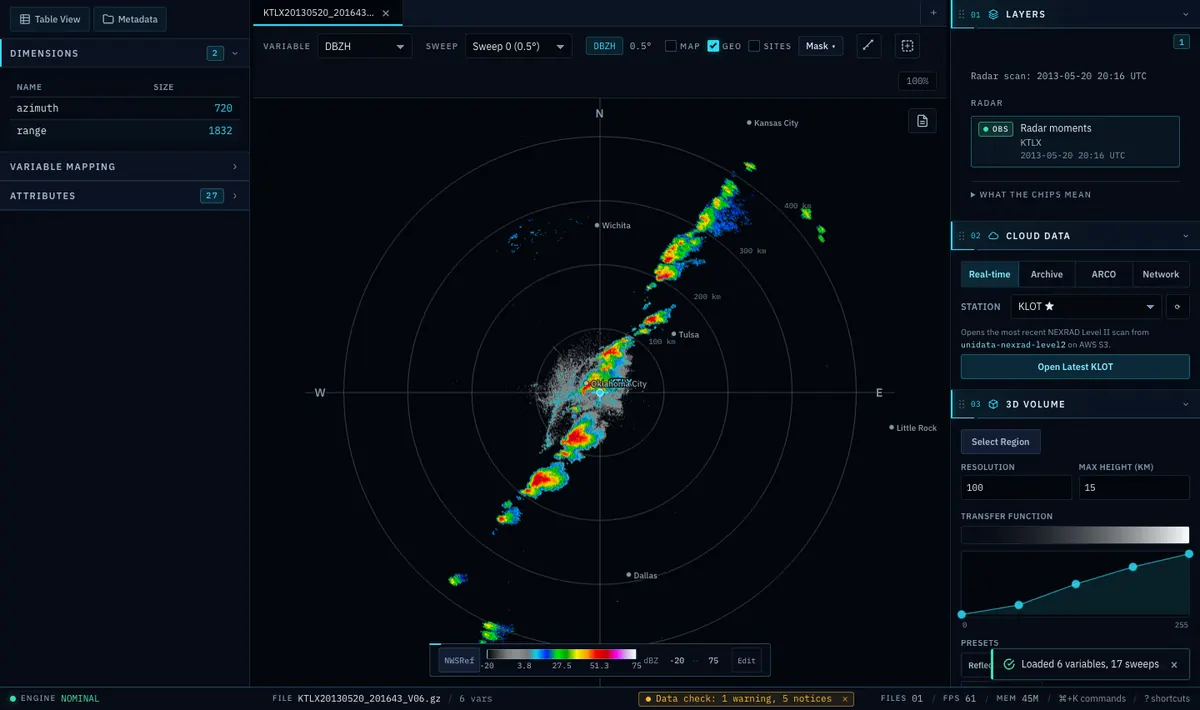
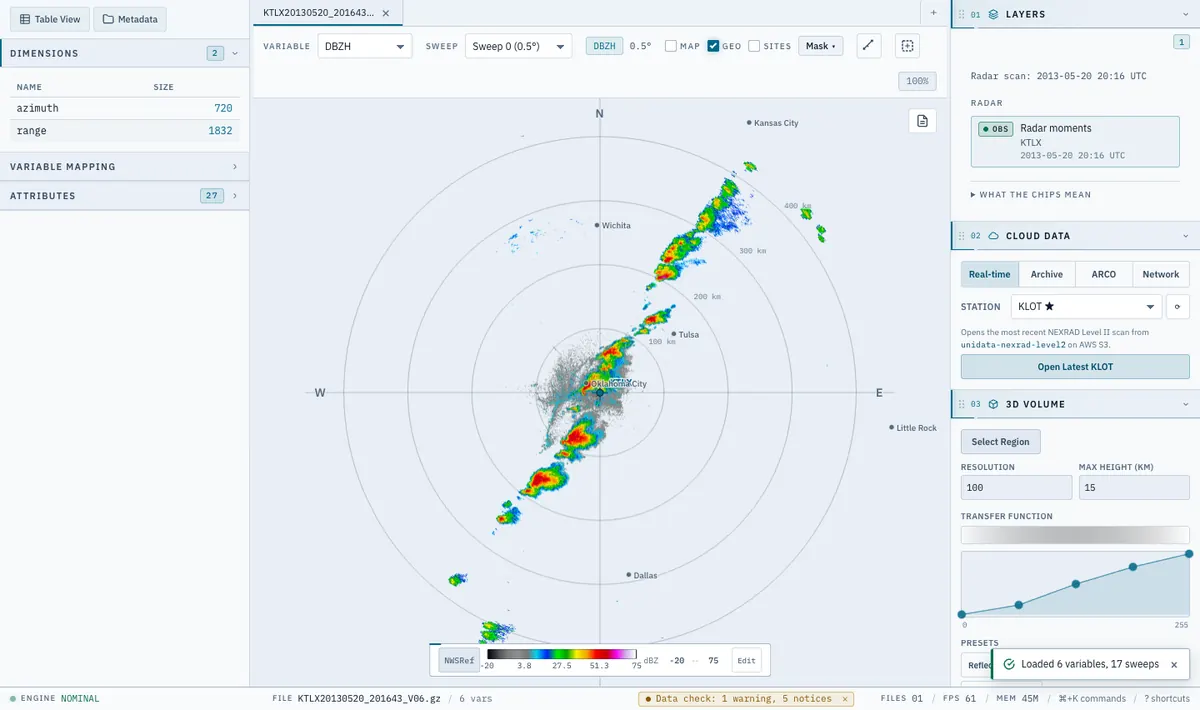
Radarx 2D view, dark theme: reflectivity of a squall line, with the range rings and a colour bar Radarx 2D view, light theme: reflectivity of a squall line, with the range rings and a colour bar
KTLX reflectivity, 20 May 2013, 0.5 degree sweep, in the 2D view. Map background off.

See it in 2D

Pan and zoom a plan-position view drawn on the GPU. The colour scale changes how data looks, never what it is: the value under the cursor is always the real value.

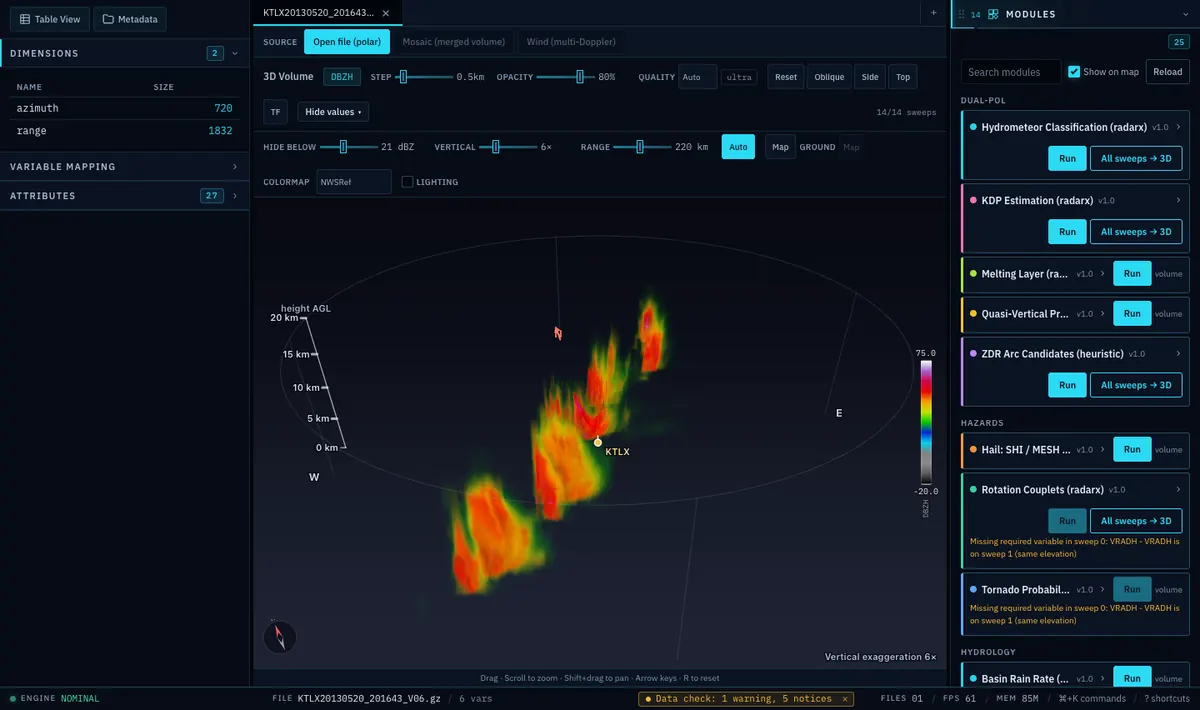
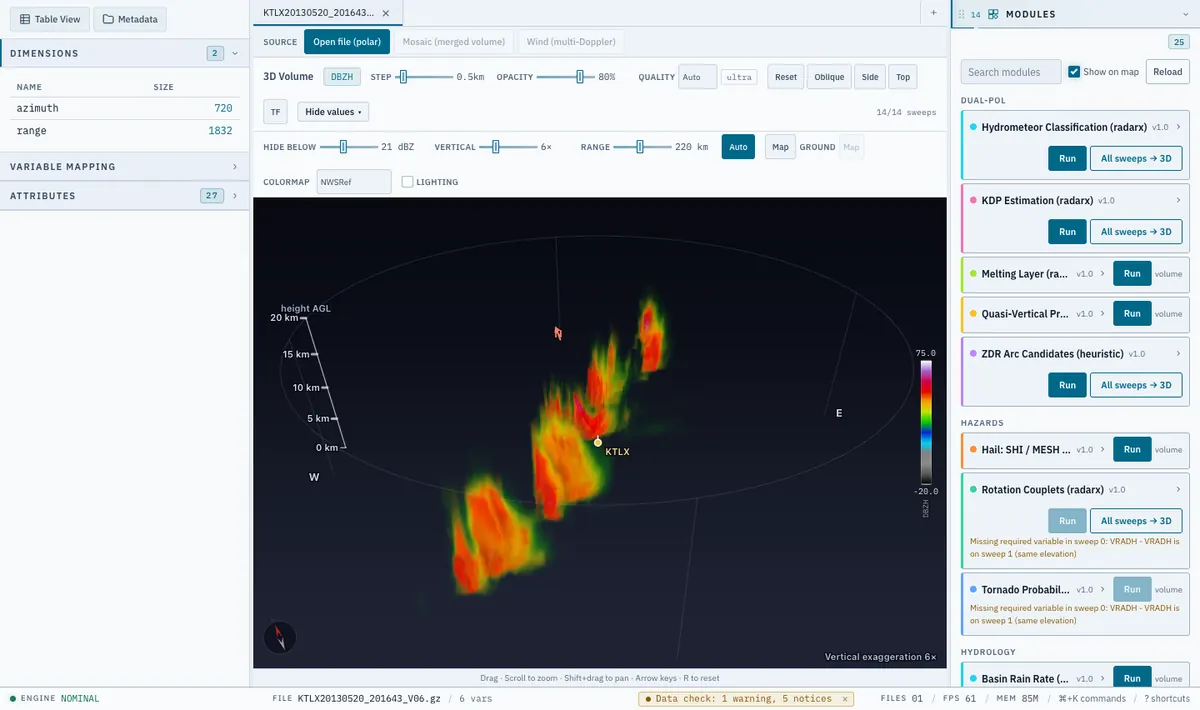
Radarx 3D view, dark theme: a ray-marched volume of the Oklahoma squall line with a height axis Radarx 3D view, light theme: a ray-marched volume of the Oklahoma squall line with a height axis
The same KTLX volume in 3D. The vertical exaggeration (6 times here) is printed on the image.

Then in 3D

Every sweep is ray-marched on the GPU, with a transfer-function editor and an adjustable vertical exaggeration that is always shown on screen. Drag to orbit, scroll to zoom.

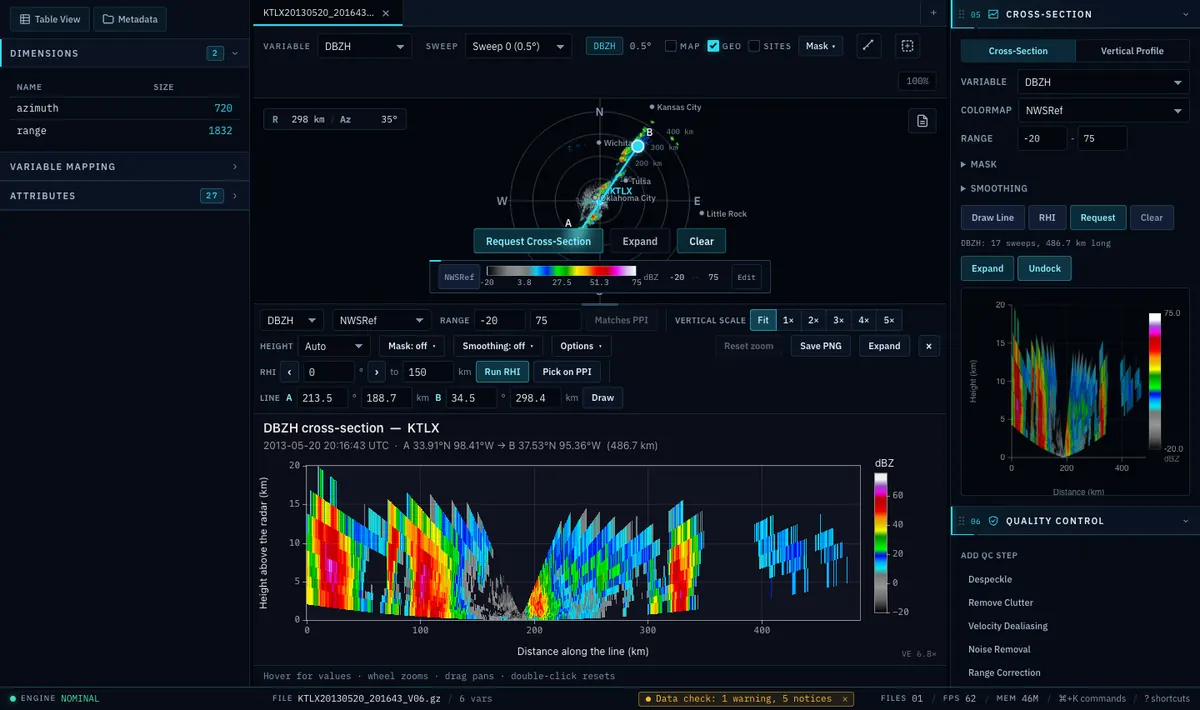
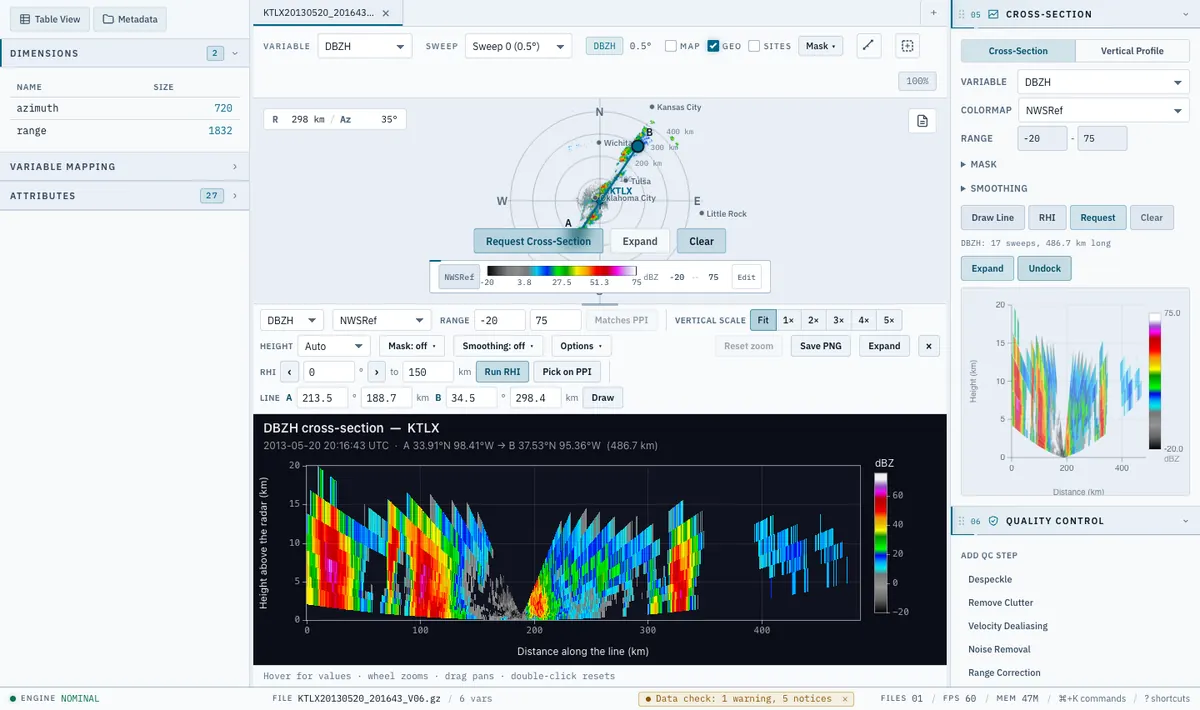
Radarx cross-section, dark theme: a line drawn on the PPI and the vertical section below it with height and distance axes Radarx cross-section, light theme: a line drawn on the PPI and the vertical section below it with height and distance axes
A line drawn on the KTLX scan and the vertical section cut along it, 486.7 km long, docked under the PPI.

Cross-sections

Draw a line on the PPI, or click an azimuth for an RHI-style cut, and get a vertical section of the whole volume with axes in kilometres, a colour bar, a hover read-out and PNG export. Parts of the circle that were not scanned stay empty.

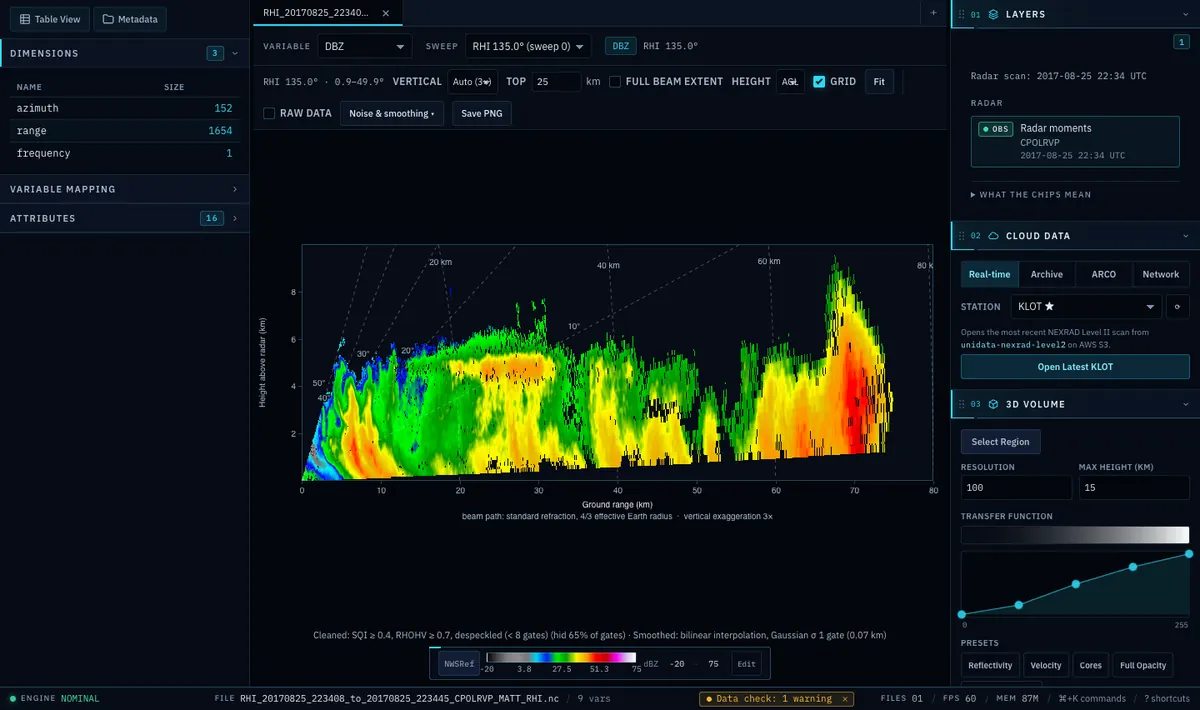
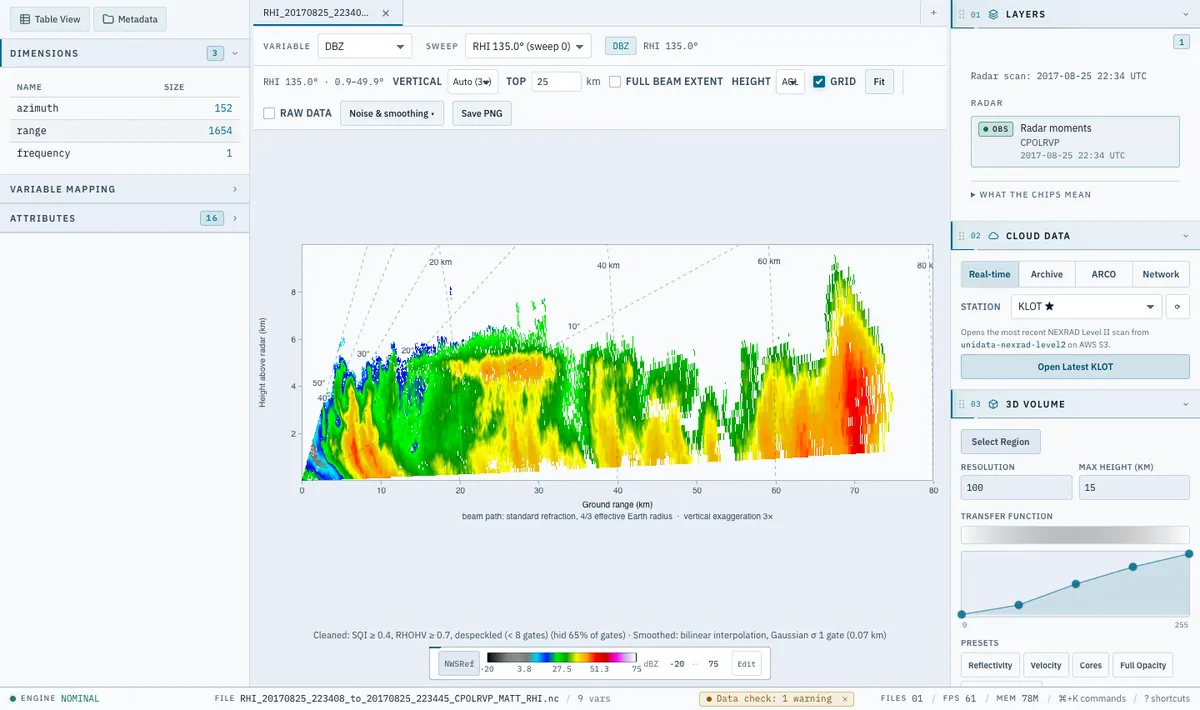
Radarx range-height view, dark theme: a vertical cut through a storm with ground range and height axes Radarx range-height view, light theme: a vertical cut through a storm with ground range and height axes
A CPOL range-height scan (RHI), 25 August 2017, azimuth 135 degrees. The cleaning and smoothing that were applied are written under the plot, and so is the 3 times vertical exaggeration.

Range-height scans

RHI sweeps are recognised and drawn as what they are: ground range along x, height along y. Heights follow a 4/3 effective Earth radius beam model, which the axis states. Untidy real files (rays stored out of order, interleaved passes, pseudo-RHIs cut from a volume) are handled.

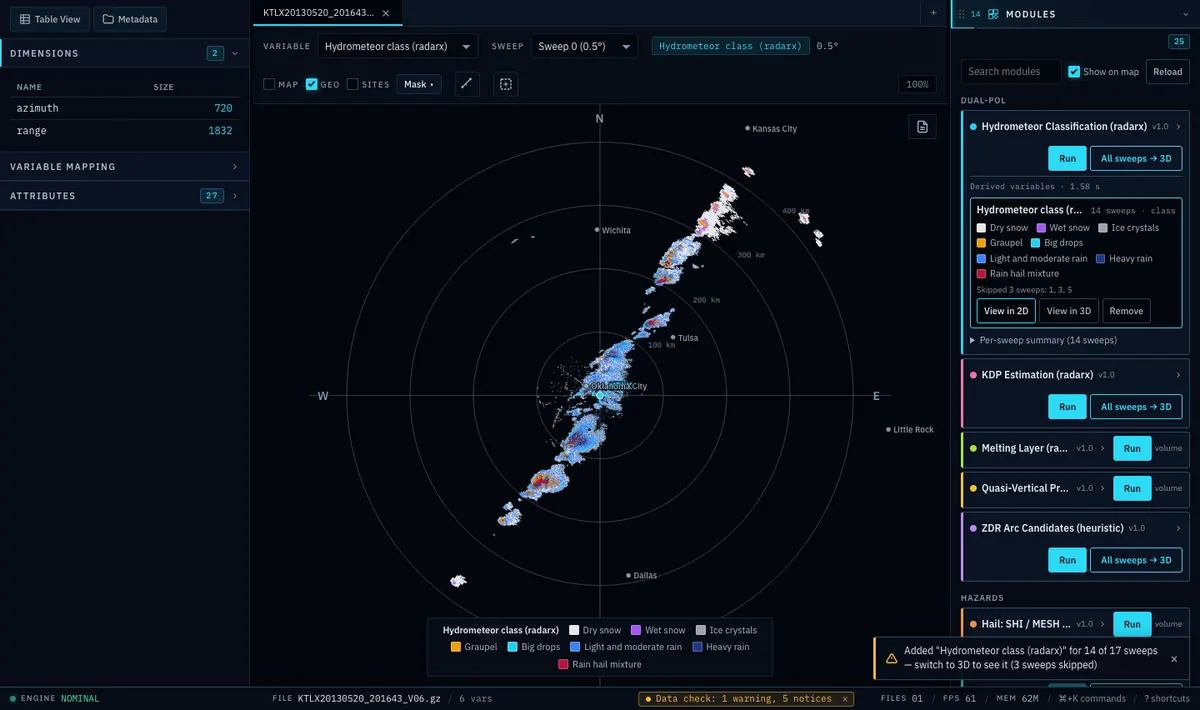
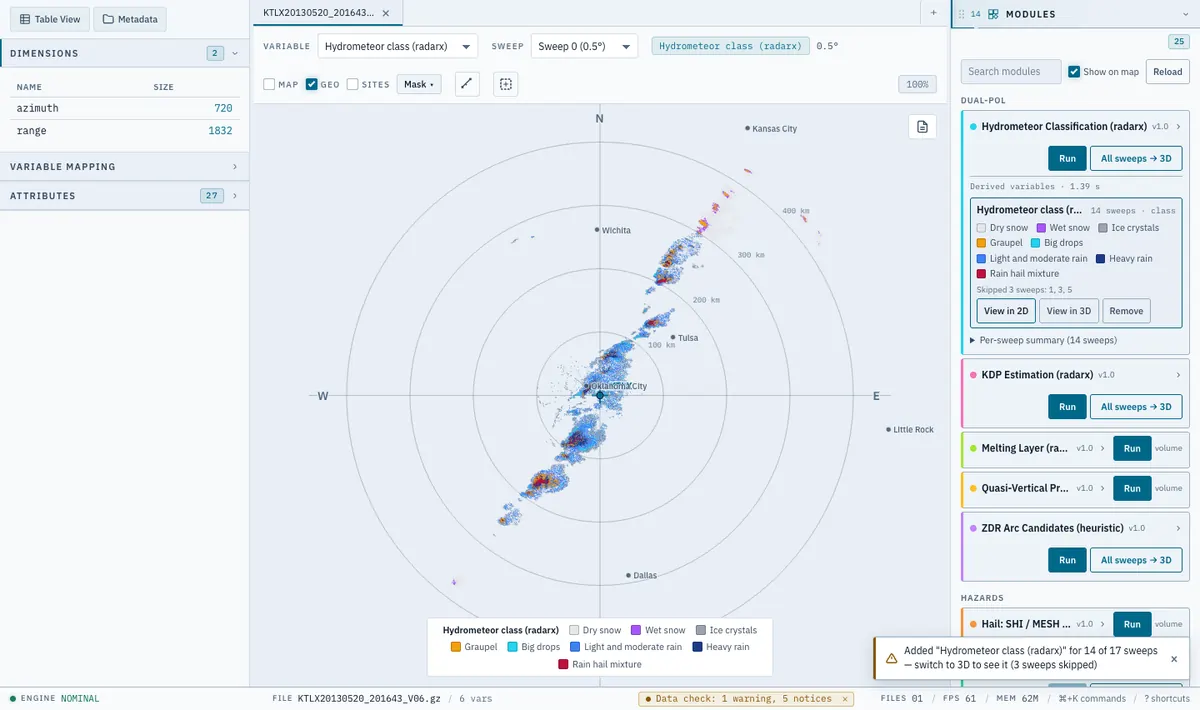
Radarx 2D view, dark theme, showing hydrometeor classes from an algorithm, with the Modules panel open Radarx 2D view, light theme, showing hydrometeor classes from an algorithm, with the Modules panel open
Hydrometeor classes from the radarx library, run on the KTLX volume of 20 May 2013 (14 of its 17 sweeps; the app lists the three it skipped). A retrieval with assumptions, not an observation.

Algorithms and quality control

Algorithms are plug-in modules. The ones included cover hydrometeor classification, KDP, rainfall, hail (SHI and MESH), rotation couplets, shear, ZDR arcs and columns and storm detection. A result is a field you can view in 2D and 3D, not just a table. Quality control (an SNR gate, fuzzy-logic echo classification, speckle removal, noise correction) is a set of switches you can turn off one by one.

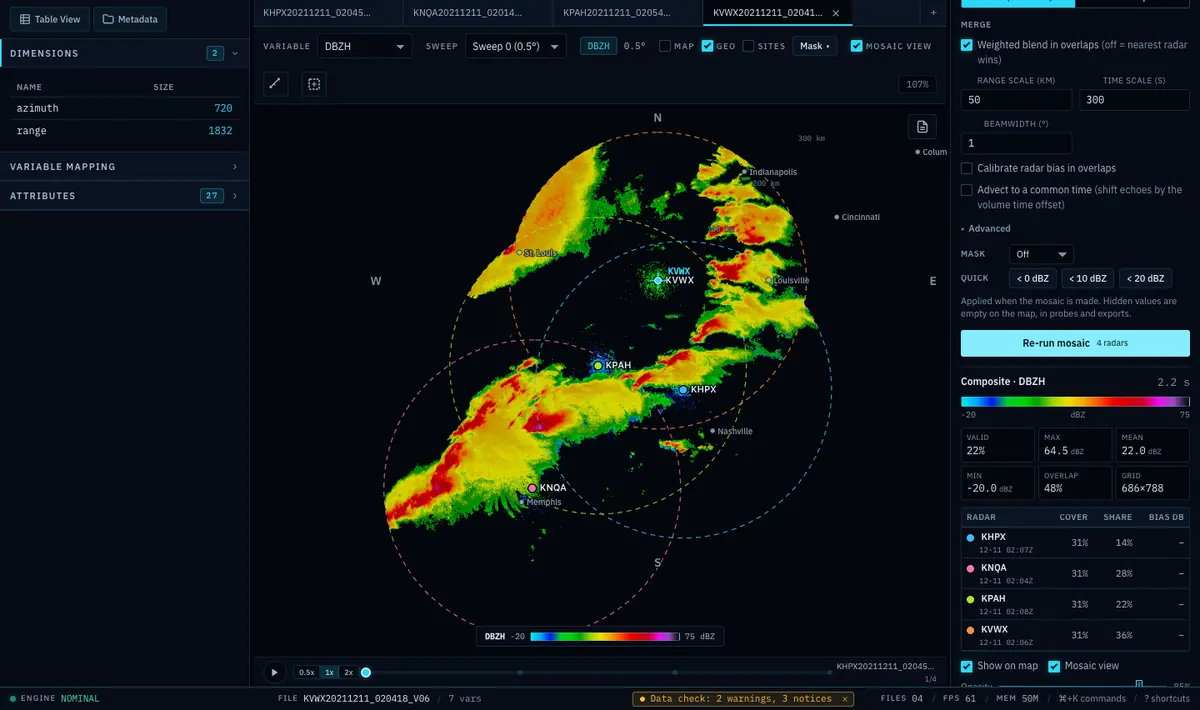
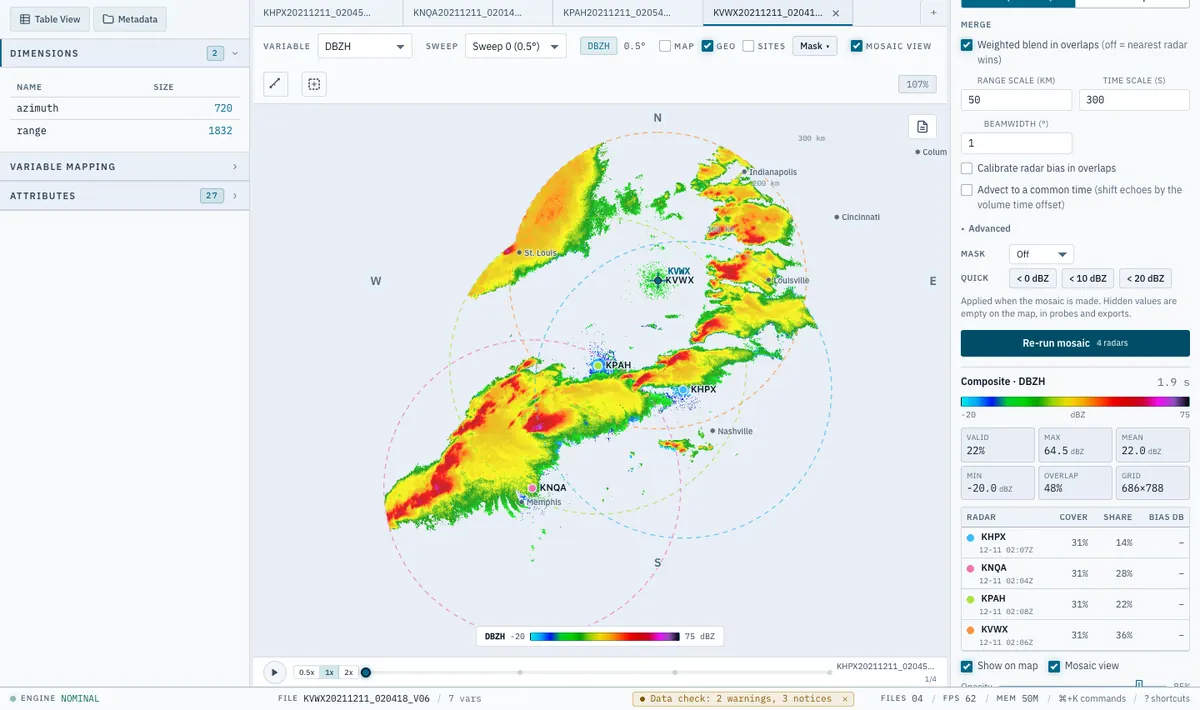
Radarx mosaic, dark theme: composite reflectivity of four radars over the central United States with their range rings Radarx mosaic, light theme: composite reflectivity of four radars over the central United States with their range rings
Composite reflectivity of four NEXRAD radars (KHPX, KNQA, KPAH, KVWX), about 02:04 UTC on 11 December 2021, merged with radarx. Cells that no radar measured an echo in are left empty.

Mosaics of several radars

Merge several radars onto one grid and look at the result over the map or as a 3D volume. The merge (a weighted blend in overlaps, or nearest radar) and the grid are listed next to the result.

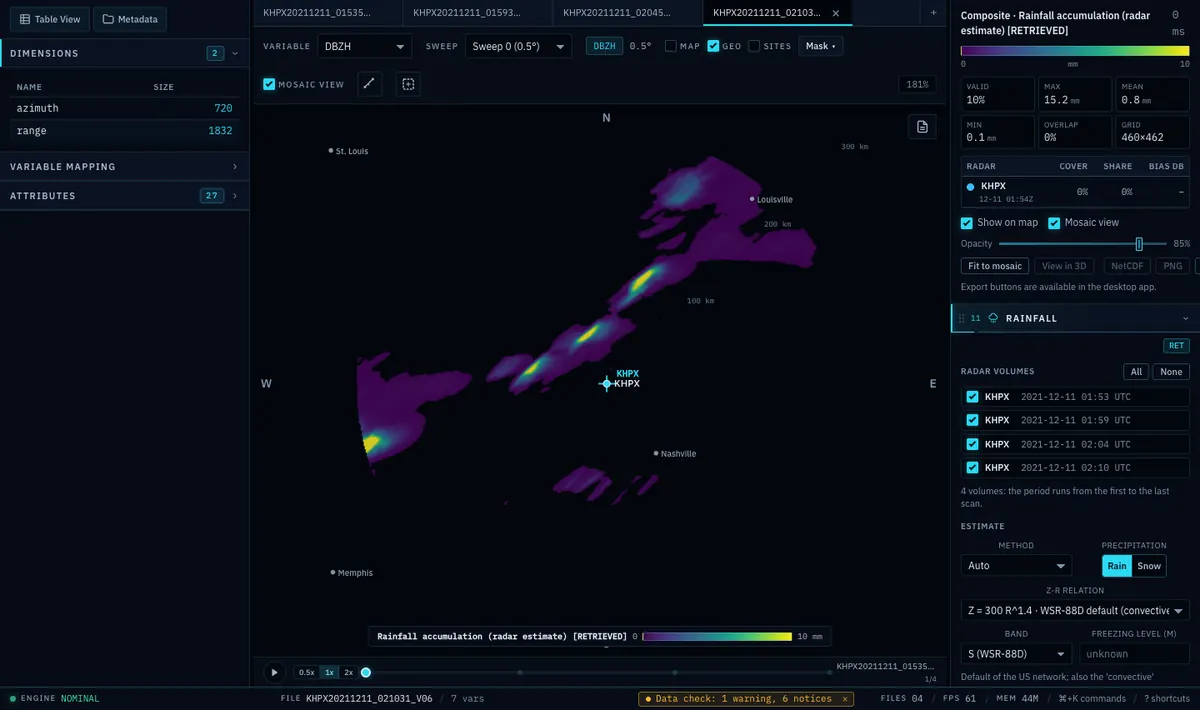
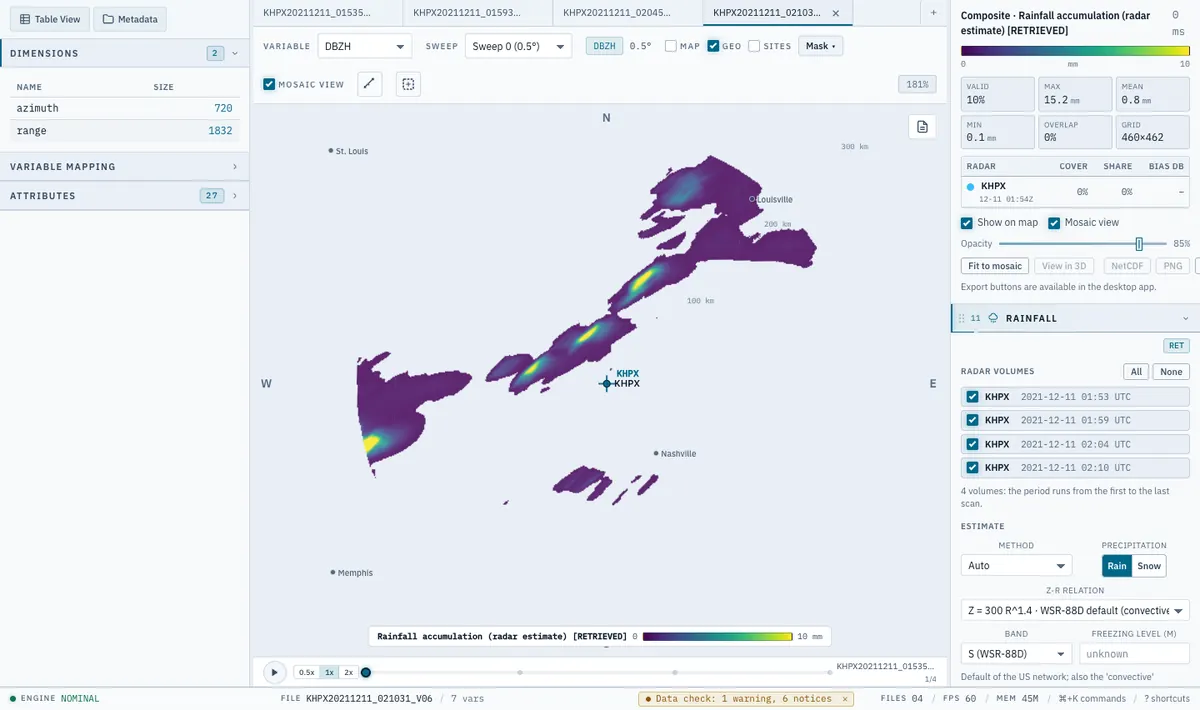
Radarx rainfall panel, dark theme: an accumulation map labelled as a radar estimate with its colour scale in millimetres Radarx rainfall panel, light theme: an accumulation map labelled as a radar estimate with its colour scale in millimetres
A rainfall accumulation estimate from four KHPX volumes, 11 December 2021 (about 01:53 to 02:10 UTC). The app labels it RETRIEVED: an estimate, never an observation.

Rain rates and accumulation

Rain rate and accumulation with a selectable relation (Z-R, KDP, Z-ZDR or hybrid), with uncertainty and beam quality next to every number, optional adjustment to rain gauges, and basin-average rainfall.

Also in the app

  • Multi-Doppler winds from two or more radars, shown as animated 3D flow and arrows on the same scene as the storm. The flow follows the retrieved wind only, with no extrapolation outside the analysis.
  • Animations and storm films: a storm-centred 3D clip from many volumes, with frames between real volumes marked as interpolated.
  • Standards-clean exports: PNG, SVG and PDF figures; NetCDF (CfRadial1), CfRadial2, Zarr and CSV data, with software versions, every parameter and a history line per step.
  • Command line and Python: everything the window does also runs without it, on the same engine, with the rxd command and a Python API.
  • Cloud data: open NEXRAD Level II straight from AWS; a dialog says what will be fetched and how big it is before anything is downloaded.

See it

Three films made with Radarx

Each film is built from real radar data and carries its own labels on screen. Nothing is loaded from YouTube until you press play.

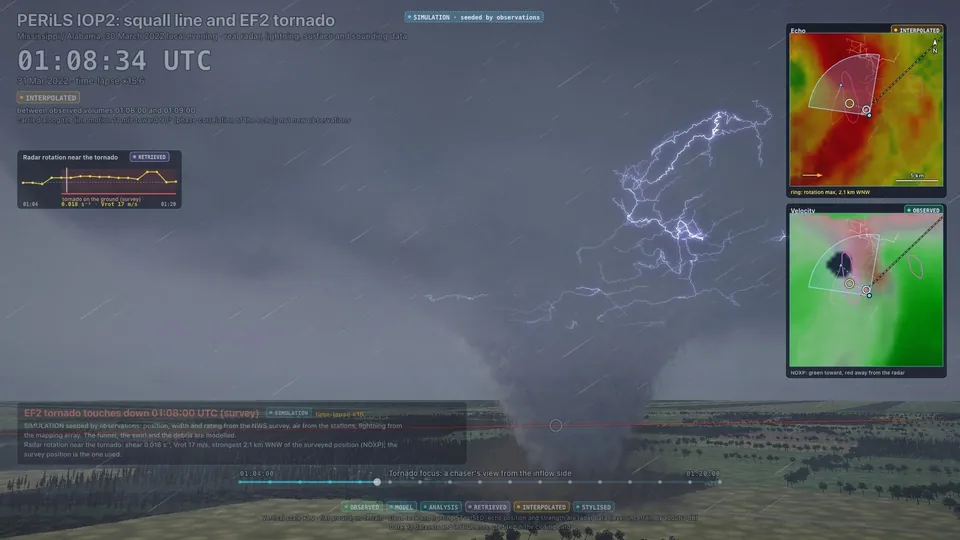
A frame from the film: a simulated tornado funnel under a squall line with lightning, with radar and velocity inserts and the labels on screen

Squall line and EF2 tornado, 30 March 2022

From the PERiLS 2022 field campaign: six radars merged onto one grid, 3D lightning mapping, surface and sounding data, and the tornado damage survey. About 16 minutes of data (31 March 01:04 to 01:20 UTC) in two minutes.

What is real and what is not: the tornado funnel, its swirl and the debris are a labelled simulation seeded by the survey. The shape of each lightning channel and all the sound are modelled.
Watch on YouTube

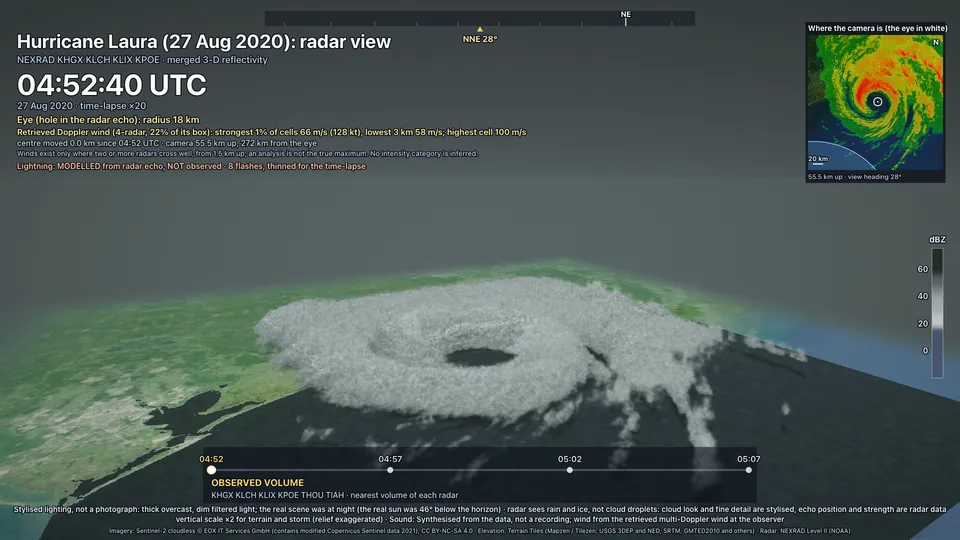
A frame from the film: a 3D view of Hurricane Laura's eye and rain bands with a map inset and the labels on screen

Hurricane Laura's rain bands, 27 August 2020

Four NEXRAD radars (KHGX, KLCH, KLIX, KPOE) merged in 3D, 04:52 to 05:08 UTC, about 15 minutes of data in 48 seconds.

What is real and what is not: lightning and sound are modelled. The cloud look is stylised. The map imagery is a 2021 satellite composite, not the scene of that night. Frames between radar scans are interpolated.

Watch on YouTube

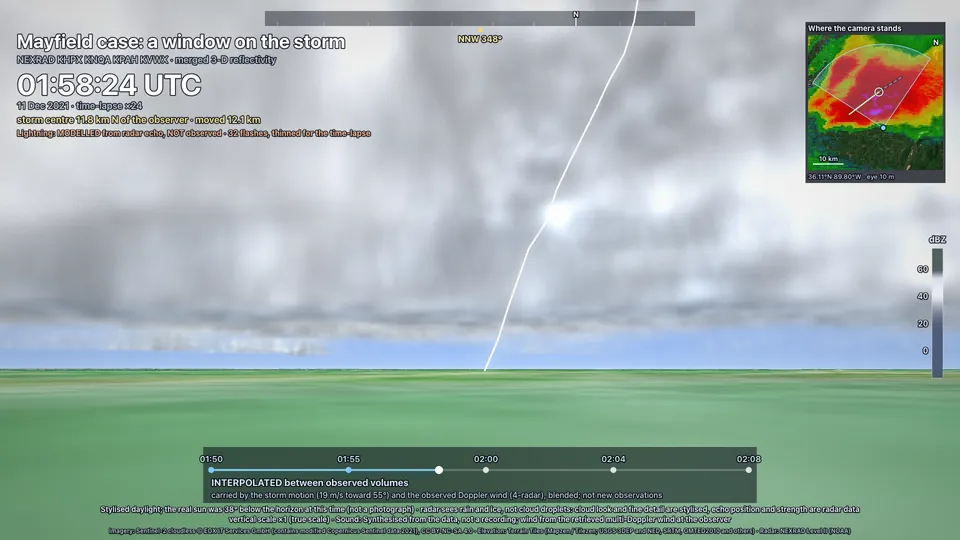
A frame from the film: a ground-level view of a storm cloud over flat fields with a map inset and the labels on screen

A severe storm near the Mississippi River, 10 December 2021

Four NEXRAD radars (KHPX, KNQA, KPAH, KVWX) merged in 3D, following the strongest cell the software found, 11 December 01:50 to 02:09 UTC.

What is real and what is not: lightning and sound are modelled. The lighting is a stylised daylight look (it was night). The imagery is a 2021 satellite composite. Frames between radar scans are interpolated. This film does not show the Mayfield, Kentucky tornado, which was farther east, and nothing in these data says that the cell shown produced a tornado.

Watch on YouTube

Radar data: NOAA National Weather Service WSR-88D Level II from the Unidata NEXRAD archive on AWS; the PERiLS film also uses the PERiLS 2022 datasets credited in its closing card. Film imagery: Sentinel-2 cloudless 2021 by EOX IT Services GmbH (contains modified Copernicus Sentinel data 2021), CC BY-NC-SA 4.0. Terrain: AWS Terrain Tiles. The pictures above are frames from the films.

Science you can check

Every layer says what it is

Radarx is built for people who put numbers and pictures in papers and reports, so it holds itself to one rule: nothing is invented, and nothing that was not measured is dressed up as measured. Every layer carries one of four labels.

Observed

A measurement as the instrument reported it, for example the radar moments in a NEXRAD or ODIM file.

Model / analysis

Output of a numerical model, or an analysis that blends observations and a model.

Retrieved

A quantity inferred from observations by an algorithm with assumptions: hydrometeor classes, rain rates, multi-Doppler winds.

Simulated / stylised

Something drawn or computed to look like something, not to measure it. It is opt-in and labelled on the image.

What that means in practice

  • Gaps stay gaps. Sectors that were not scanned stay empty; nothing is filled in and shown as measured.
  • Interpolation, advection and models are declared, and frames between real scans carry an “interpolated” mark.
  • Every retrieval has a documented limits section: assumptions, and where it is known to fail.
  • Opening a file and viewing a scan download no radar or model data. Anything that needs the network asks first.
  • Stylised looks never change the data underneath: values, masks and positions stay as measured.

Reproducible, and honest about gaps

  • An output is accompanied by a record that is enough to rerun it: input file names, software and library versions, every parameter, the order of steps and the time it was made (UTC).
  • Files the app writes carry source file names (never paths of your machine) and a history line per step.
  • Not finished yet: provenance in the hover read-out and a generated citation block. The science policy says so itself.
  • Reproducible case studies: coming soon (github.com/syedhamidali/radarx-cases).

Read the science policy

Download

Get Radarx

One file per computer type. The newest published release is listed below, read from GitHub when this page opens.

Loading the list of downloads from GitHub…

macOS (the tested platform)

The installers are not yet code-signed, so macOS shows a warning the first time.

  • Drag the app to Applications and open it.
  • If macOS says it cannot be opened or is “damaged”: open System Settings, Privacy & Security, and click Open Anyway.
  • Or run once in Terminal: xattr -cr "/Applications/<the app>.app"

Windows (experimental)

The Windows build exists but has not been tested by hand. It is not code-signed, so Windows shows a warning.

  • Run the installer. At the blue SmartScreen box click More info, then Run anyway.

Linux (experimental)

The Linux builds exist but have not been tested by hand.

  • Ubuntu, Debian: sudo apt install ./the-file.deb
  • Fedora, Red Hat: sudo dnf install ./the-file.rpm

The first start can take up to a minute while your system scans the app; after that it starts in about a second.

Documentation

Guides for every feature

The documentation covers installing, opening data, the 2D and 3D views, modules, mosaics, winds, rainfall, the command line and the Python API, and the science policy.

Open the documentation

Licence and cost

Free for noncommercial use

Radarx is source-available under the PolyForm Noncommercial License 1.0.0: you may use, copy and modify it for noncommercial purposes such as personal use, research, education, charities, public-interest and government use.

Commercial use needs a separate written licence from the copyright holder. Commercial licensing: not announced yet. This page quotes no prices.

The app builds on third-party software, fonts, colour maps, data and imagery, each under its own terms; they are listed in THIRD_PARTY_NOTICES.md. One optional layer, the Sentinel-2 cloudless imagery of the realistic ground, is itself noncommercial (CC BY-NC-SA 4.0).

The licence wording and these notices are still to be reviewed by a lawyer. Nothing on this page is legal advice.

Requirements

What you need

Requirements for running Radarx
Computer A Mac with Apple silicon or an Intel chip (the tested platform); Windows 10 or 11, or Ubuntu, Debian, Fedora or Red Hat Linux (experimental, not tested by hand).
Software Nothing else to install: the installers include the Python engine. The 3D views draw with WebGL2, so a graphics driver that supports it is needed.
Account A free account is required to use the app. The first start shows a sign-in screen; after that it opens straight in, and it keeps working offline for up to 30 days after you last signed in. Older 0.2 releases have no sign-in. Your radar files and results stay on your computer. See the privacy notice (a draft).
Internet Not needed to view files. It is used only for things you switch on: map background tiles, cloud data, imagery, and update checks.
Disk The installers are roughly 125 to 300 MB each (see the sizes in the list above); the bundled engine is about 220 MB unpacked.